WEATHER
Current conditions
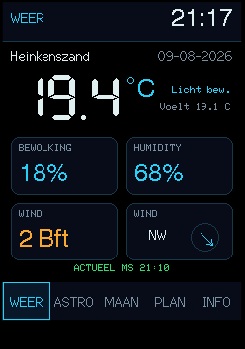
This is the first screen after startup. It shows the current weather before you move on to the astronomical advice.
 123
123- 01Current overview
Your location, date, temperature and a short description of the current weather appear at the top.
- 02Four key values
Cloud cover, humidity, wind force and wind direction summarise the conditions right now.
- 03Freshness and navigation
The green line shows when the data was updated; use the bottom bar to open another screen.
 123
123
 123
123 123
123 123
123